The DiffusionBear app icon: a neon low-poly bear head wearing a visor, traced with cyan and emerald circuit-board lines on dark brushed metal.

v0.4.1 Official Release SDXL Memory Fix & SOTA Benchmark

DiffusionBear -
Local AI image generation on Apple Silicon

A free macOS studio that runs SDXL (and its derivatives), FLUX.1, FLUX.2 Klein 4B/9B, FLUX.3 Klein 5.6B, MOSS-Image SFT 5B, Qwen-Image-2.1 & Turbo, Krea 2 Turbo, and Z-Image-Turbo on your Mac's own Metal GPU. Powered by lossless JIT compilation (@mx.compile), fast compiled VAE decoders, and on-canvas Virtual Boxes for spatial layout control. Fits up to 13B models cleanly inside 16 GB of unified memory with zero cloud dependency.

Apple Silicon & macOS 26.2+  ·  v0.4.1 release  ·  v0.4.1 release & checksums  ·  First-launch Gatekeeper fix

DiffusionBear v0.4.1 announcement poster — generated locally with Virtual Boxes, announcing MOSS-Image SFT 5B and FLUX.3 Klein 5.6B
Generated 100% locally in DiffusionBear v0.4.1 using on-canvas Virtual Boxes — see the MOSS-Image 5B Custom Pipeline & DMD Benchmark.
Model Configurations
17 Tested Configs
Across 4 major families: FLUX, Krea 2, DiT / Next-Gen & SDXL.
Fits in
16 GB RAM
Zero Metal thrashing, auto working-set memory eviction & fast TAESD VAE.
Leaves your Mac
Nothing
No telemetry, no analytics. Works 100% offline after setup.
Official v0.4.1 Benchmark Arena +51.9% SDXL speedup · 100% visual parity

Apple Silicon Metal Memory Optimization & Lossless JIT Compilation

DiffusionBear v0.4.1 introduces systematic Metal memory clearing, unconstrained working-set allocation, and sub-second TAESD VAE decoding. This completely eliminates cache thrashing across unified memory — accelerating SDXL runs by +51.9% suite-wide (4.25x faster on Lightning down to 9.2s/image) with 100% bit-identical visual recovery (∞ dB PSNR). Explore our complete 187-generation empirical benchmark across 17 model configurations.

SDXL Lightning9.2s (+76.5%)
RealVisXL V5.042s (+72.5%)
Z-Image Turbo120s (+26.5%)
Explore Benchmark & Slider →

Why DiffusionBear runs on your machine

  • 100% on-device

    Every pixel is computed on your Mac's Metal GPU. There is no server between you and the image.

  • No account

    No email, no sign-in, no password. Optional tokens for Hugging Face and Civitai make downloads smoother — nothing requires them.

  • No credits

    Unlimited generations. Nothing to buy, no quota, no metered API. It is free software.

  • Nothing uploaded

    No prompts, no reference images, no outputs. There is no telemetry and no analytics in the app.

  • Works offline

    Fetch the weights once, then pull the network cable. Generating, prompt enhancement and the gallery all keep working.

  • Free & MIT

    MIT-licensed and public on GitHub. Read it, fork it, build it yourself — the packaging scripts are in the repo.

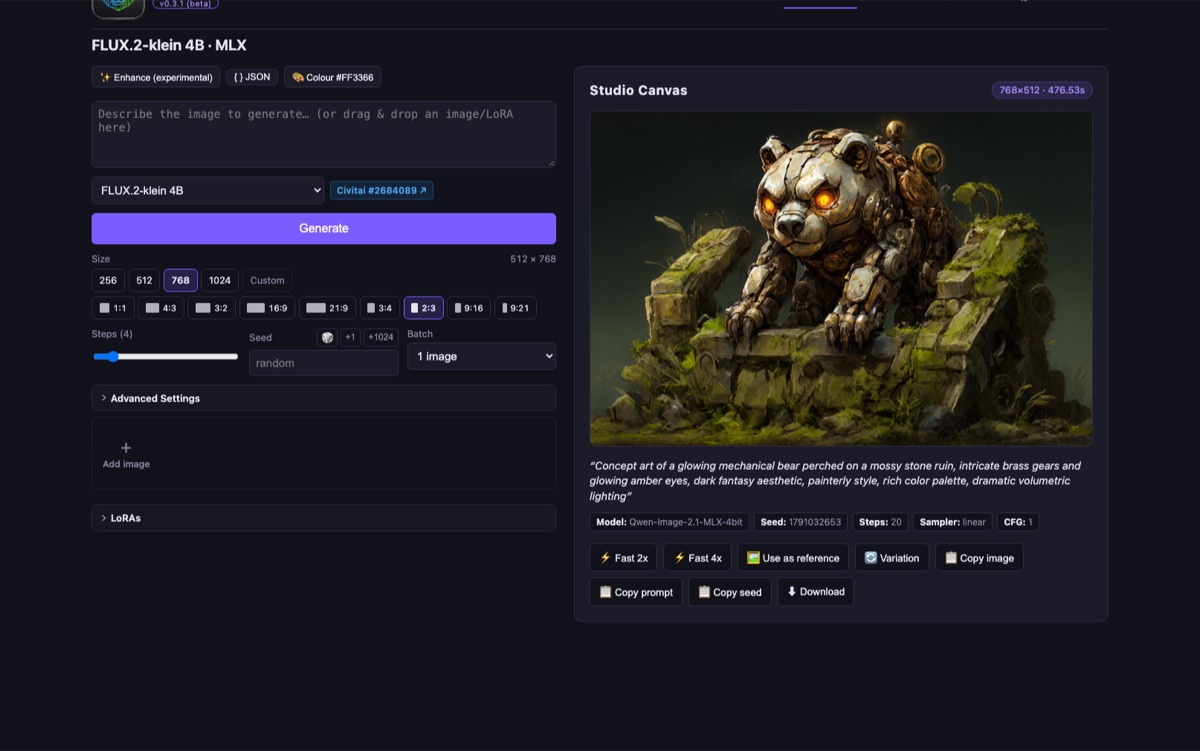
The v0.4.1 interface

Seven views, one local studio

Everything the app does happens in a window on your Mac. New in v0.4.1: interactive Virtual Boxes right on the Studio Canvas, MOSS-Image SFT 5B with 4/8-step DMD distillation, FLUX.3 Klein 5.6B, gallery Favorites & Privacy Blur, custom samplers, and Apple Silicon Metal memory optimization.

The DiffusionBear v0.4.1 Generate tab running FLUX.3-klein 5.6B with seven color-coded Virtual Boxes drawn directly on the Studio Canvas.

Virtual Boxes & FLUX.3 Klein 5.6B (Dark & Light modes)

Draw and drag color-coded spatial bounding boxes right on the Studio Canvas to place characters, objects, and exact typography without ControlNet. Toggle Dark & Light Studio modes to switch every screenshot below.

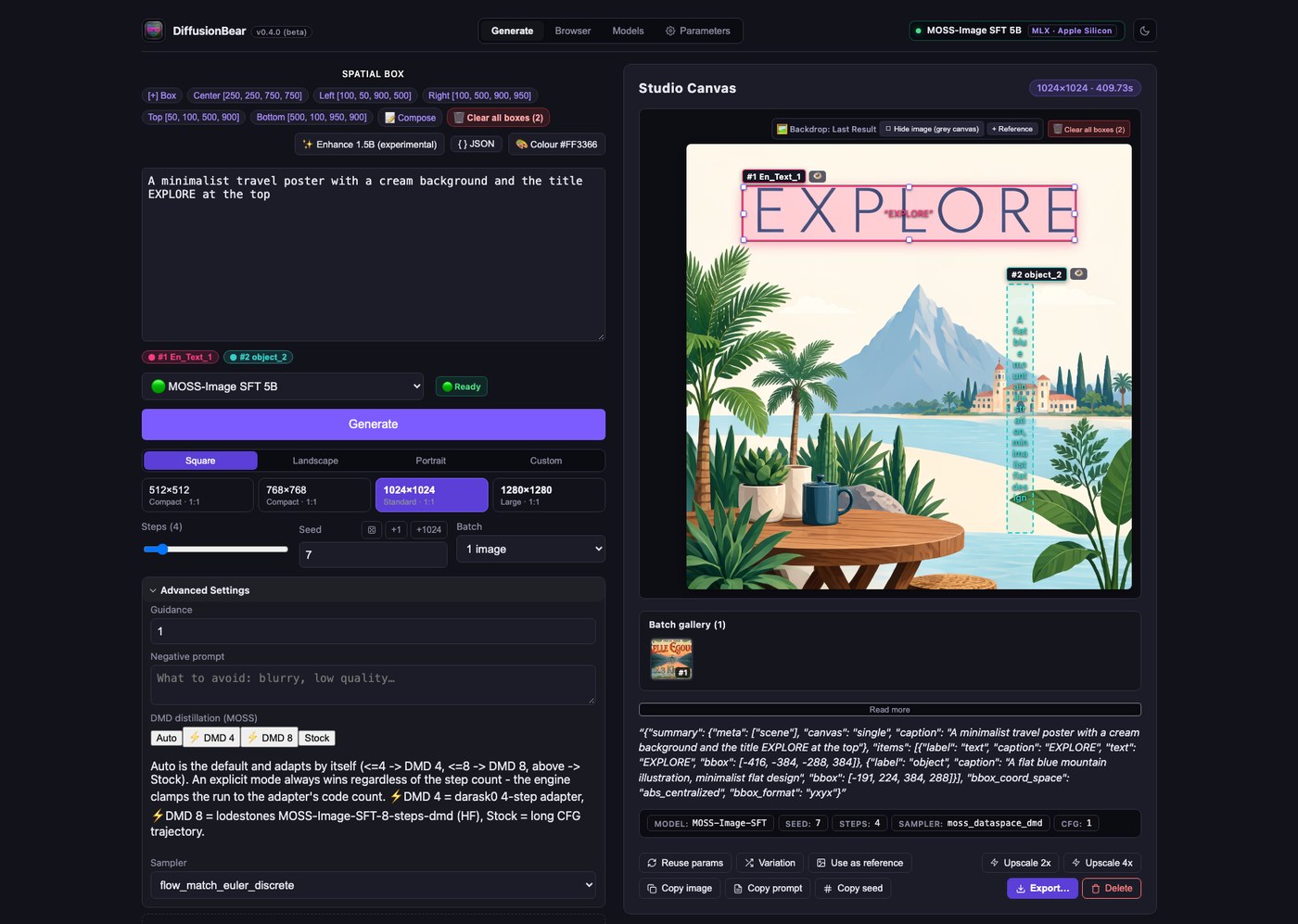
MOSS-Image SFT 5B generating a travel poster in 4 steps using the DMD 4 step-distillation adapter and on-canvas Virtual Boxes.

MOSS-Image SFT 5B & 4/8-Step DMD Distillation

Generate crisp posters and scenes with MOSS-Image SFT 5B. Switch between Auto, ⚡ DMD 4 (4-step fast), ⚡ DMD 8 (8-step balanced), and Stock trajectories with spatial canvas boxes.

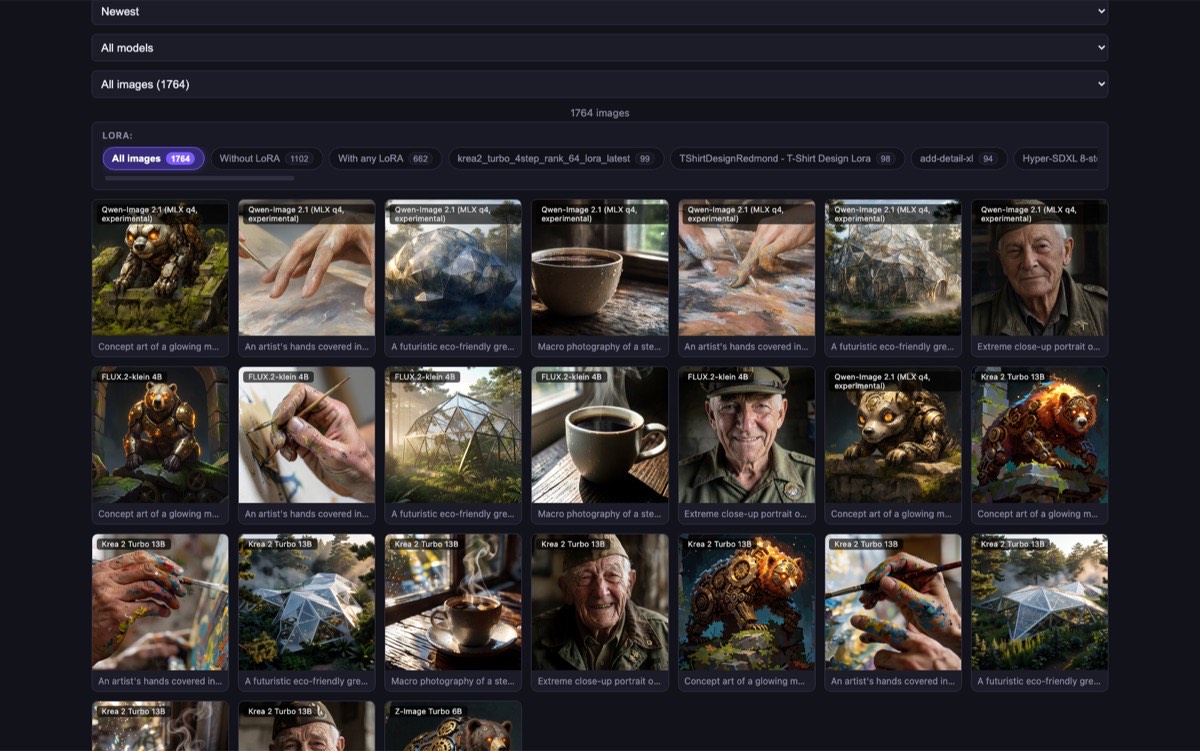
The DiffusionBear Image Browser showing 684 local images, the Favorites filter button, star badges, and Blurred privacy cards.

Local Gallery with Favorites & Privacy Blur

Every generation saved locally with full metadata. Star your best shots with the new ☆ Favorites filter, and toggle Blurred privacy overlays on individual cards when sharing your screen.

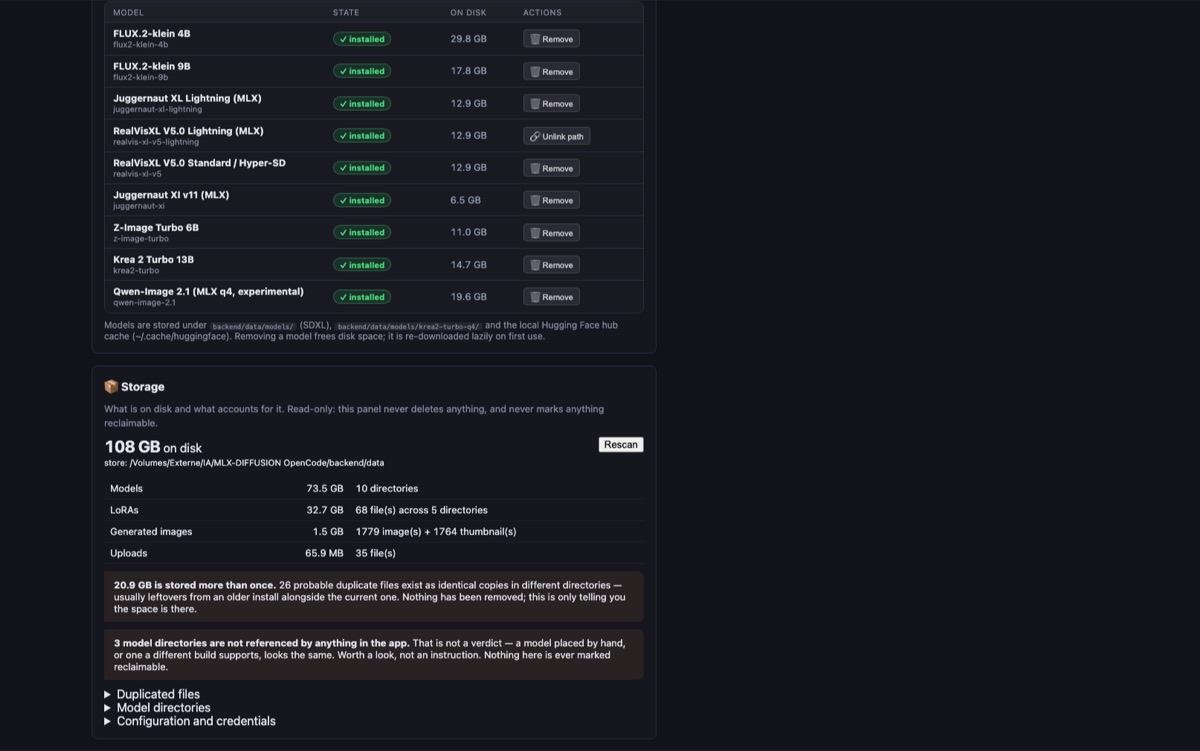
The Model Browser & Downloader showing Hugging Face, Civitai, Draw Things, and DiffusionBee tabs plus installed FLUX.1, FLUX.2, FLUX.3, and Juggernaut models.

Model Manager & External Libraries

Search Hugging Face and Civitai directly, or import existing local Draw Things and DiffusionBee libraries in read-only mode. Single-file SDXL, Pony & Illustrious checkpoints auto-convert on the fly.

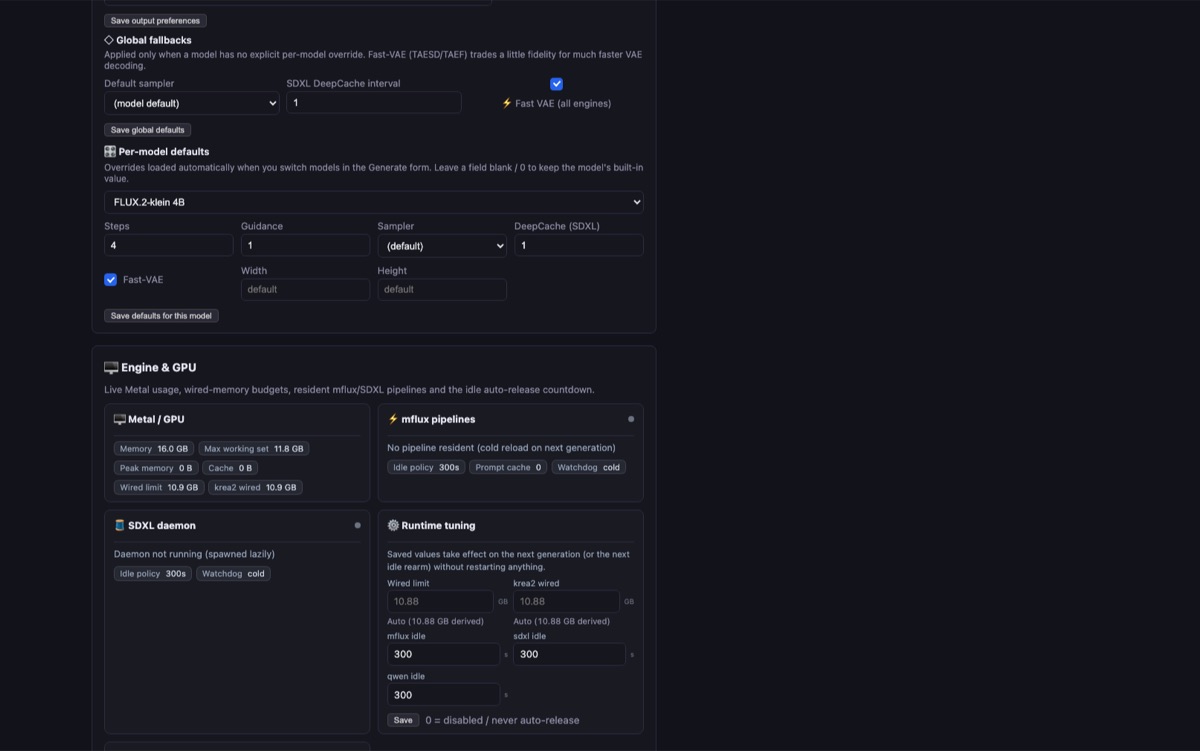
The Parameters tab showing 9 interface languages, per-model defaults, live Metal GPU memory telemetry, mflux pipelines, and SDXL daemon status.

Smart Memory Management & Custom Samplers

Live Metal GPU telemetry, wired-memory budgets, idle pipeline auto-release watchdogs, per-model defaults, and a drop-in installer for custom Python samplers.

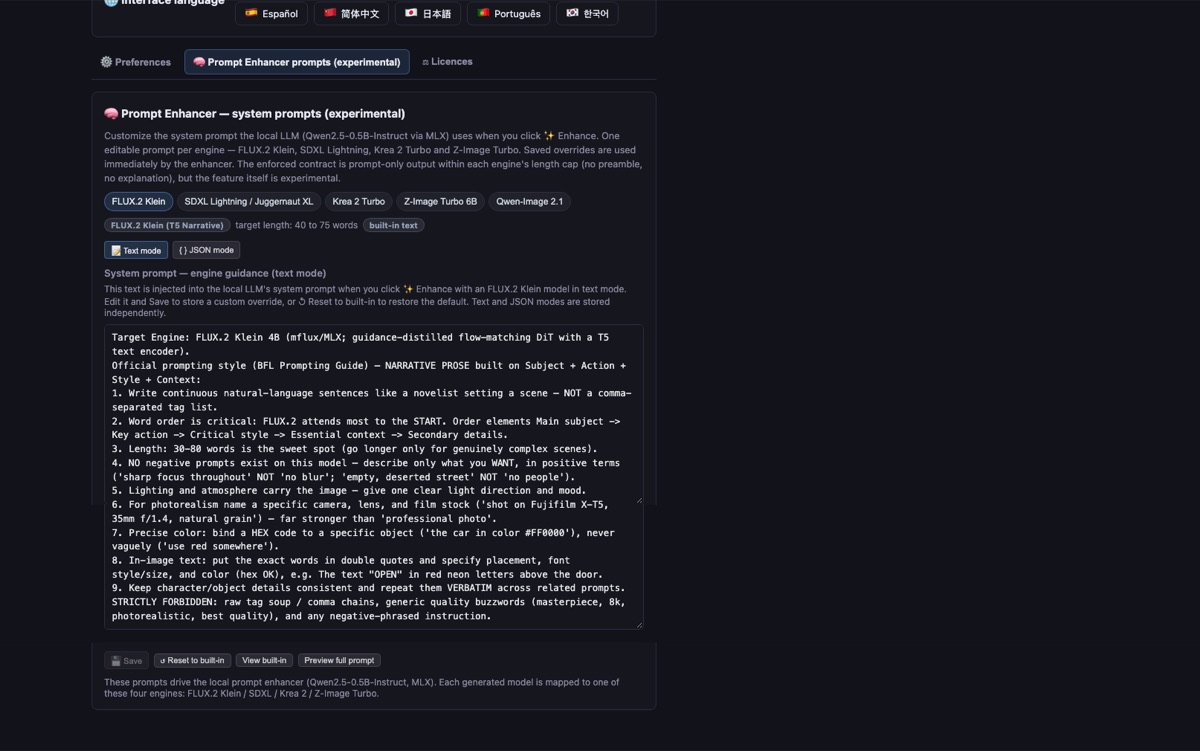
The Prompt Enhancer tab: dual local LLM selector (Qwen2.5-0.5B / 1.5B) with Text mode and JSON mode prompts for each engine.

Dual Local Prompt Enhancer (Prose & JSON)

On-device Qwen2.5-0.5B and 1.5B models expand short ideas into detailed prose or structured { } JSON layouts — and automatically unload before generation to save 1.2 GB of RAM.

v0.4.1 Supported Models & Features

Every major diffusion family, tuned for 16 GB Macs

From 4-step lightning drafts to spatial poster composition with Virtual Boxes. Every model runs locally on your Apple Silicon GPU and swaps cleanly in and out of unified memory. Explore our 187-run v0.4.1 Benchmark Arena →

Supported models in DiffusionBear v0.4.1, default step counts, reference-image support, and Virtual Boxes
ModelFamilyStepsReference imagesVirtual BoxesHighlights
SDXL & DerivativesSDXL4–500—Juggernaut XL Lightning (~9s), RealVisXL V5.0 Lightning & Hyper-SD, Juggernaut XI v11, plus custom single-file SDXL, Pony & Illustrious checkpoints (auto-converted up to 50 steps) with CLIP Skip.
FLUX.1-schnellFLUX.141—Classic 4-step rectified flow generation with full FLUX.1 LoRA ecosystem support.
FLUX.2 Klein 4BFLUX.24up to 10—Fast 4-step flow-matching DiT with multi-reference blending (up to 10 images) and LoRA support.
FLUX.2 Klein 9BFLUX.24up to 10—9-billion-parameter flagship DiT for superior photorealism, lighting, and multi-image composition.
FLUX.3 Klein 5.6BFLUX.38–16up to 10Yes (HUD)New in v0.4.1: 16-step flow-matching distilled engine with interactive Virtual Boxes for exact spatial grounding and multi-box typography.
MOSS-Image SFT 5BMOSS4 / 8 / 251Yes (HUD)New in v0.4.1: Built-in ⚡ DMD 4 (4-step) and ⚡ DMD 8 (8-step) distillation adapters, interactive Virtual Boxes, MLX q8-g64 text encoder, and LoRAs. (Custom pipeline & DMD benchmark →)
Qwen-Image-2.1Qwen20–251—7B single-stream DiT with Qwen3-VL text encoder, negative prompt support, and 64-channel RGBA VAE.
Qwen-Image-Turbo-2.1Qwen4–81—Step-distilled Qwen-Image 2.1 variant for rapid 4-to-8 step generation.
Krea 2 Turbo 13BKrea 24–81—13B photorealistic engine with persistent Q4 text-encoder cache (eliminating the 7.5 GB bf16 spike) and 4-step Turbo LoRA.
Z-Image-Turbo 6BZ-Image6–81—Fast, compact 6B engine with crisp architectural geometry and prompt adherence.
  • Interactive Virtual Boxes (Studio Canvas)

    Draw, resize, and label color-coded spatial boxes directly on the Studio Canvas for FLUX.3 Klein 5.6B and MOSS-Image SFT 5B. Place characters, objects, and exact poster typography where you want them — no ControlNet setup required.

  • Smart 16 GB Unified Memory Management

    Engineered so 16 GB Macs never hit swap death: the local Prompt Enhancer auto-unloads before generation (saving 1.2 GB), 512px cosine-blended VAE tiling cuts 1024×1024 decode spikes by 4.5 GB, Krea 2 caches a 2.2 GB Q4 text encoder, and idle watchdogs free GPU memory automatically.

  • MOSS-Image SFT 5B & DMD Distillation

    Run MOSS-Image SFT 5B in 4 steps (⚡ DMD 4 darask0 adapter), 8 steps (⚡ DMD 8 lodestones adapter), or full Stock CFG trajectory — complete with MLX 8-bit text encoding and JSON spatial composition. Explore the interactive MOSS Pipeline & DMD Lab →

  • SDXL, Pony & Illustrious Auto-Conversion

    Download or import any single-file .safetensors SDXL, Pony, or Illustrious checkpoint. DiffusionBear converts it into a fast MLX pipeline on first use with up to 50 steps and adjustable CLIP Skip.

  • DiffusionBee & Draw Things Import

    Already have models on your Mac? Browse and import your local DiffusionBee (.tdict) and Draw Things model & LoRA folders with a strict read-only guarantee that never alters your original files.

  • Gallery Favorites & Privacy Blur

    Filter your best creations with 1-click ☆ Favorites, and click Blurred on any gallery card to hide sensitive prompts and images behind a frosted glass overlay until clicked.

  • Dual Local Prompt Enhancer (Prose & JSON)

    Switch between on-device Qwen2.5-0.5B and 1.5B to turn brief ideas into rich descriptive prose or structured { } JSON scene layouts while preserving LoRA trigger words.

  • Custom Samplers & Studio Toolbar

    Drop in custom Python .py samplers from the Parameters tab, reuse any image's exact settings in one click, generate instant variations, or upscale 2× / 4× on the canvas.

  • Nine Languages & Transparent Licences

    Full interface in English, French, German, Italian, Spanish, Simplified Chinese, Japanese, Portuguese, and Korean — plus a built-in licence table showing commercial vs. non-commercial model terms.

Installation & macOS Gatekeeper

Up and running in 60 seconds

DiffusionBear ships as a self-contained macOS application (DiffusionBear.app) with its own Python and MLX runtime bundled inside. No Xcode, no Homebrew, and no Python setup required.

  1. 1. Download & move to ApplicationsDownload DiffusionBear-0.4.1-arm64.zip, unzip it, and drag DiffusionBear.app into your /Applications folder. (Important: always move it into /Applications before opening.)
  2. 2. Bypass the first-launch macOS Gatekeeper promptBecause DiffusionBear is a free, independent open-source project signed ad-hoc (without a paid $99/yr Apple Developer ID notarization), macOS shows “DiffusionBear” Not Opened on the very first launch. Choose either method below once:
  3. Option A — Fastest (1-Second Terminal Command)Open Terminal.app, paste this command, and press Return:
    xattr -cr /Applications/DiffusionBear.app
    Then double-click DiffusionBear.app — it opens right away!
  4. Option B — No Terminal (macOS System Settings)1. Double-click DiffusionBear.app in /Applications and click Done on the alert.
    2. Open System Settings → Privacy & Security.
    3. Scroll down to the Security section and click Open Anyway next to "DiffusionBear was blocked to protect your Mac".

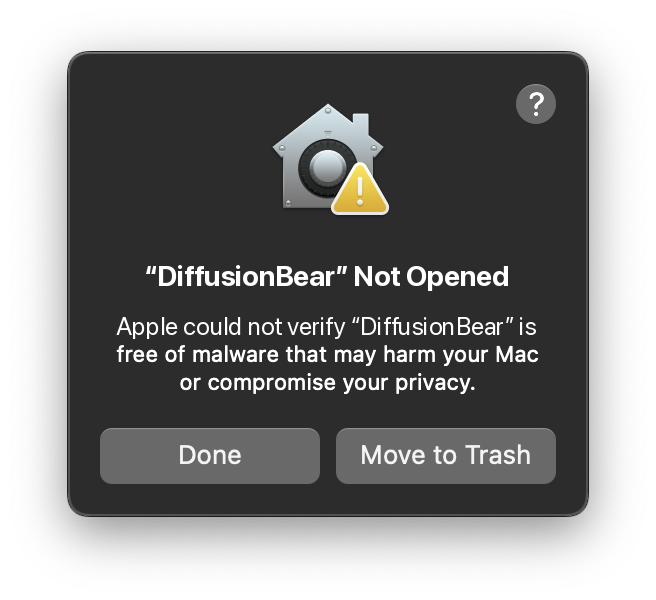
Standard first-launch macOS alert

macOS Gatekeeper dialog showing “DiffusionBear” Not Opened — Apple could not verify DiffusionBear is free of malware

After running xattr -cr /Applications/DiffusionBear.app or clicking Open Anyway once, macOS remembers your choice and never shows this dialog again.

Call for testers

Try v0.4.1, then tell me what broke

DiffusionBear v0.4.1 is available and I want it in the hands of people who will actually push on it — especially the new SDXL Metal memory fixes, FLUX.3 Klein 5.6B, MOSS-Image SFT 5B, Virtual Boxes, and 16 GB memory pipeline. It is free, MIT-licensed and entirely local, so there is nothing to sign up for and nothing at risk.

The most useful thing you can send back is a failure: a Metal error, a model that will not load, a dimension that runs out of memory, a UI that contradicts itself. That is the whole job right now.

  • Apple Silicon only, 16 GB unified memory recommended. No Intel and no CUDA path — MLX is Metal and macOS only.
  • Ad-hoc signed. macOS Gatekeeper halts the first double-click with “DiffusionBear” Not Opened. Move it to /Applications, open Terminal and run xattr -cr /Applications/DiffusionBear.app (or click Open Anyway in System Settings > Privacy & Security). The warning does not return afterwards.
  • Smart 16 GB memory safeguards. Dynamic working-set budget, post-generation Metal cache purges, and tiled VAE decode keep generation times fast and memory stable on 16 GB Macs.
  • Model licences vary. FLUX.2/3-klein and Juggernaut are non-commercial. The app ships a licence table so you can check before you publish anything.
  1. Download the v0.4.1 buildGrab the arm64 zip from the releases page and unzip it. You get DiffusionBear.app — no installer, no admin rights.
  2. Open it the first timeMove to /Applications, then run xattr -cr /Applications/DiffusionBear.app in Terminal (or click Open Anyway in System Settings > Privacy & Security). Expected for an ad-hoc signed build.
  3. Pick an engine and download itThe Models tab has the downloader built in. Try Juggernaut XL Lightning (~9s), FLUX.3 Klein 5.6B, or MOSS-Image SFT 5B with DMD 4-step distillation.
  4. Compose with Virtual BoxesOn FLUX.3 Klein or MOSS-Image SFT, click [+] Box above the prompt to draw spatial boxes right on the Studio Canvas and position characters or poster text.
  5. Report what went wrongOpen an issue with your macOS version, your chip and the exact error text. Metal errors are the most valuable ones.

Questions

The things people ask first

Does DiffusionBear need an internet connection?

Only once, to fetch the model weights. Model files are a few GB for the first model and are cached locally. After that the app generates, enhances prompts and manages LoRAs fully offline — unplug the network and it keeps working.

Do I need an account, and does it cost anything?

No account and no cost. DiffusionBear is MIT-licensed, there are no credits and there is nothing to buy. Two optional tokens — a Hugging Face token and a Civitai API key — make downloads smoother and unlock gated models, but nothing requires them.

Do my prompts and images ever leave my computer?

No. There is no telemetry, no analytics and no network call at generation time. Generation, prompt enhancement and the gallery are all local. The only moment anything is transmitted is when you explicitly download model weights or export an image somewhere.

Which Macs can run DiffusionBear?

Apple Silicon Macs only, on macOS 26.2 or later. It is built on Apple's MLX framework, which is Metal and macOS exclusive, so there is no CUDA or CPU fallback. 16 GB of unified memory is the realistic floor; weights are 4-bit quantised so that a 4B to 13B model fits.

Is it safe to open DiffusionBear on macOS? (Fixing “DiffusionBear Not Opened”)

Yes, completely. DiffusionBear is 100% open-source (MIT licensed), runs entirely on your Mac's Metal hardware, and contains zero network telemetry or tracking.

Because the app is distributed directly with ad-hoc signing (without a paid Apple Developer ID notarization certificate), macOS Gatekeeper flags the downloaded binary on the first double-click with this alert:

macOS Gatekeeper alert: “DiffusionBear” Not Opened
“DiffusionBear” Not Opened
Apple could not verify “DiffusionBear” is free of malware that may harm your Mac or compromise your privacy.

To authorize and launch the app:

  1. Move DiffusionBear.app into your /Applications folder (do not run it directly from inside the mounted DMG or zip).
  2. Method 1 (Fastest — Terminal 1-Liner): Open Terminal.app and run:
    xattr -cr /Applications/DiffusionBear.app
    (or: sudo xattr -rd com.apple.quarantine /Applications/DiffusionBear.app)
  3. Method 2 (GUI): Open System Settings > Privacy & Security, scroll down to the Security section, and click Open Anyway.

Once authorized, the warning never returns and DiffusionBear opens immediately on all subsequent double-clicks.

Can I use the images commercially?

That depends on the model, not on the app. Krea 2, Z-Image and Qwen-Image are Apache-2.0. FLUX.2-klein and Juggernaut XL Lightning are licensed non-commercially. The Licences tab in the app spells out the terms for every model it can run — check it before publishing.

Why is it called DiffusionBear? Are you related to DiffusionBee?

This project started life as MLX-Diffusion and was renamed to DiffusionBear in October 2026. The new name is an homage to DiffusionBee — the app that made local image generation on a Mac feel effortless. Its author has been a long-time DiffusionBee user and fan, and with DiffusionBee's development stopping in 2024 the field was left wide open for something new. To be completely clear: DiffusionBee is the work of divamgupta and its contributors. DiffusionBear is an independent and unrelated project — not a fork, not a continuation, and not affiliated with, sponsored by or endorsed by DiffusionBee or its authors. The two are also licensed differently: DiffusionBee is AGPL-3.0, DiffusionBear is MIT.